
.NET 11 is generally available from November 10, 2026, and you can download it from the official website. It’s an STS release, so it receives patches for two years, until November 14, 2028.
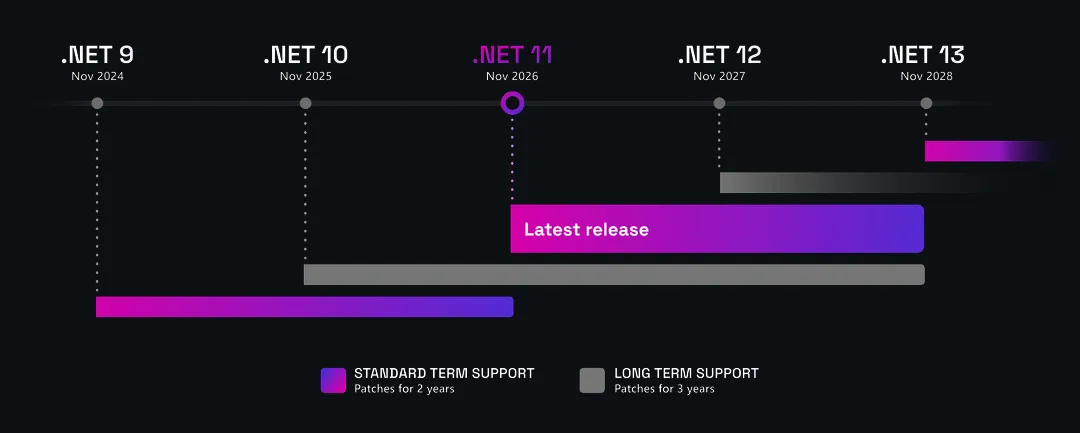
Source: Microsoft, .NET support policy
This release is stacked with new features. This post covers what’s new in C# 15 and in the .NET 11 runtime, libraries and SDK.
So, let’s get started.
C#
Union types
In my experience, union types are one of the most anticipated additions to .NET. They were more than ten years in the making (if you wonder why, this C# language design discussion will give you a good sense), with the first explicit proposal dating back to February 20, 2015.
As the name suggests, a union type combines several case types into a single type. A value of that union holds exactly one of its declared case types at a time:
public sealed record User(int Id, string Name);

public sealed record Success<T>(T Value);

public sealed record ApiError(string Message);

// Wrapping T in Success<T> keeps the success and failure cases distinct even
// when T itself is ApiError.
public union Result<T>(Success<T>, ApiError);

public static class UserService
{
    // Each case type converts implicitly to the union
    public static Result<User> GetById(int id) => id == 1
        ? new Success<User>(new User(1, "Pavle"))
        : new ApiError($"User {id} was not found.");
}
Case types can be any type that converts to object, including classes, structs, interfaces, type parameters, nullable types, generics, and other unions.
A generated union stores its current value internally as object?:
- If the case is a value type, the value is boxed.
- If the case is a reference type, its reference is copied.
public union IntOrString(int, string);

IntOrString number = 42;      // int is a value type, so it's boxed
IntOrString text = "hello";   // string is a reference type, so the reference is copied

public record class None;
public record class Some<T>(T Value);
public union Option<T>(None, Some<T>);
Unions are closed: the declaration lists every possible case type, so the compiler can check that a switch expression handles each one. Every case needs an arm, including null. When nullable analysis requires a null arm and it’s missing, the compiler reports warning CS8655. An unhandled value that reaches a non-exhaustive switch expression at runtime causes a SwitchExpressionException.
app.MapGet("/users/{id:int}", (int id) =>
{
    Result<User> result = UserService.GetById(id);

    return result switch
    {
        Success<User> success => Results.Ok(success.Value),
        ApiError error => Results.NotFound(error),
        // A default union holds null; without this arm it would throw
        // SwitchExpressionException at runtime.
        null => Results.Problem("No result was returned."),
    };
});
GET /users/999 returns a 404 with the error case:
{"message":"User 999 was not found."}You can also create custom unions with the [Union] attribute and the IUnion interface. That’s useful when you want a class-based union or a different storage strategy than the generated object? field:
[System.Runtime.CompilerServices.Union]
public struct Shape : System.Runtime.CompilerServices.IUnion
{
    private readonly object? _value;

    public Shape(Circle value) { _value = value; }
    public Shape(Rectangle value) { _value = value; }

    public object? Value => _value;
}

public record class Circle(double Radius);
public record class Rectangle(double Width, double Height);

Shape shape = new Shape(new Circle(5.0));

var area = shape switch
{
    Circle c => Math.PI * c.Radius * c.Radius,
    Rectangle r => r.Width * r.Height,
};
Closed hierarchies
Before C# 15, you could approximate a closed hierarchy with an abstract base class, a restricted constructor, and sealed descendants:
public abstract class PaymentResult
{
    // Only types in this assembly can call the constructor
    private protected PaymentResult() { }
}

public sealed class PaymentSucceeded(decimal Amount) : PaymentResult
{
    public decimal Amount { get; } = Amount;
}

public sealed class PaymentDeclined(string Reason) : PaymentResult
{
    public string Reason { get; } = Reason;
}

// The compiler still can't prove the switch is complete
IResult ToResponse(PaymentResult result) => result switch
{
    PaymentSucceeded success => Results.Ok(success),
    PaymentDeclined declined => Results.BadRequest(declined),
    _ => throw new UnreachableException(),
};
You get the same result more easily with the closed keyword. Mark the base class closed, and every direct descendant must be defined in the same assembly:
public closed class PaymentResult;

public sealed class PaymentSucceeded(decimal Amount) : PaymentResult
{
    public decimal Amount { get; } = Amount;
}

public sealed class PaymentDeclined(string Reason) : PaymentResult
{
    public string Reason { get; } = Reason;
}
There are a few characteristics to be aware of:
- A
closedclass is implicitlyabstract. - It can’t be combined with
sealed,static, or an explicitabstractmodifier. - The restriction applies only to direct descendants.
- A descendant does not automatically become
closed. - You can apply
closedseparately at multiple levels of a hierarchy. - The
closedmodifier applies to classes, including record classes.
Derivation isn’t transitive. Mark an intermediate descendant closed to restrict its direct descendants to the same assembly:
// Assembly 1
public closed record class JobStatus;
public record class Queued : JobStatus;
public record class Running(int PercentComplete) : JobStatus;
public record class Completed(TimeSpan Elapsed) : JobStatus;
public record class Failed(string Error) : JobStatus;

// Assembly 2
public record class Paused : JobStatus; // Error: 'JobStatus' is a closed class
public record class RetryableFailed(string Error, int Attempts)
    : Failed(Error); // OK: 'Failed' isn't sealed or closed
If you need to stop further inheritance, mark the last class
sealed.
Because the compiler knows every direct descendant of a closed class, it can verify that a switch expression handles every possible case, with no catch-all arm:
app.MapPost("/payments", (PaymentRequest request) =>
{
    PaymentResult result = PaymentService.Process(request);

    return result switch
    {
        PaymentSucceeded success => Results.Ok(new
        {
            success.Amount,
            Message = "Payment completed.",
        }),
        PaymentDeclined declined => Results.BadRequest(new
        {
            declined.Reason,
        }),
    };
});
That covers the nulls too: switch over a PaymentResult? and the compiler warns until you add a null arm.
Extension indexers
C# 14 introduced extension blocks, which let us group extension methods, properties, operators, and static members for a particular type without modifying the original type:
public static class SequenceExtensions
{
    extension(IEnumerable<int> sequence)
    {
        public bool IsEmpty => !sequence.Any();

        public int SumOfEven() => sequence.Where(n => n % 2 == 0).Sum();
    }
}
C# 15 expands extension blocks with support for extension indexers:
public static class EnumerableIndexer
{
    extension(IEnumerable<int> numbers)
    {
        public int this[int index] => numbers.ElementAt(index);
    }
}

IEnumerable<int> numbers = [10, 20, 30, 40];
int value = numbers[2]; // 30
Extension indexers are mostly syntactic sugar that adds [] lookup syntax to an existing type without modifying it.
They can make an API easier to read, but they don’t make it faster. The indexer above still calls ElementAt, which walks the sequence.
Collection expression arguments
When collection expressions arrived in C# 12, they made, in my opinion, a big difference in how we create collections.
Previously, each collection type had slightly different creation syntax:
int[] numbers = new int[] { 1, 2, 3 };
List<string> names = new List<string> { "Ana", "Marko" };
HashSet<string> tags = new HashSet<string> { "dotnet", "csharp" };
Span<int> buffer = stackalloc int[] { 1, 2, 3 };
And all you need now is []:
int[] numbers = [1, 2, 3];
List<string> names = ["Ana", "Marko"];
HashSet<string> tags = ["dotnet", "csharp"];
Span<int> buffer = [1, 2, 3];
Sometimes, however, a collection needs extra configuration. A List<T> might need an initial capacity, while a HashSet<T> might need a case-insensitive comparer. That meant going back to the constructor:
var names = new List<string>(values.Length * 2);
names.AddRange(values);

var tags = new HashSet<string>(StringComparer.OrdinalIgnoreCase)
{
    "dotnet", "DOTNET", "csharp"
};
C# 15 adds collection expression arguments, which pass constructor or factory arguments through a with(...) element. It must be the first element:
List<string> names = [with(capacity: values.Length * 2), .. values];

public static class TagCollection
{
    public static HashSet<string> Create() =>
        [with(StringComparer.OrdinalIgnoreCase), "dotnet", "DOTNET", "csharp"];
}
The set treats "dotnet" and "DOTNET" as equal, so TagCollection.Create() returns ["dotnet","csharp"].
The syntax itself doesn’t make anything faster, but the arguments you pass, such as a capacity, can change behavior or performance.
Labeled break and continue
Breaking out of nested loops caused me plenty of headaches throughout my career, because break and continue always apply to the nearest loop.
A common workaround was a Boolean flag:
bool found = false;

for (int row = 0; row < grid.Height; row++)
{
    for (int column = 0; column < grid.Width; column++)
    {
        if (grid[row, column].IsGoal)
        {
            found = true;
            break; // exits only the inner loop
        }
    }

    if (found)
    {
        break;
    }
}
With C# 15, you can label loops and choose which loop a break or continue statement targets:
outer: for (int row = 0; row < grid.Height; row++)
{
    for (int column = 0; column < grid.Width; column++)
    {
        if (grid[row, column].IsBlocked)
        {
            continue outer;
        }

        if (grid[row, column].IsGoal)
        {
            break outer;
        }
    }
}
For the full rules, see the labeled break and continue feature specification.
.NET runtime, libraries and SDK
Minimum hardware requirements
The minimum hardware requirements for .NET 11 now require more modern instruction sets on both x86/x64 and Arm64.
Arm64:
| OS | Previous JIT/AOT minimum | New JIT/AOT minimum | Previous R2R target | New R2R target |
|---|---|---|---|---|
| Apple | Apple M1 | (No change) | Apple M1 | (No change) |
| Linux | armv8.0-a | (No change) | armv8.0-a | armv8.0-a + LSE |
| Windows | armv8.0-a | armv8.0-a + LSE | armv8.0-a | armv8.2-a + RCPC |
x86/x64:
| OS | Previous JIT/AOT minimum | New JIT/AOT minimum | Previous R2R target | New R2R target |
|---|---|---|---|---|
| Apple | x86-64-v1 | x86-64-v2 | x86-64-v2 | (No change) |
| Linux | x86-64-v1 | x86-64-v2 | x86-64-v2 | x86-64-v3 |
| Windows | x86-64-v1 | x86-64-v2 | x86-64-v2 | x86-64-v3 |
If you try to run .NET 11 on older hardware, you may see a message similar to this:
The current CPU is missing one or more of the baseline instruction sets.
File-based apps improvements
File-based apps were in my top five features last year. Running C# straight from a single .cs file was mind-blowing.
But back then, you could only put everything in one big file (mine grew past 500 lines):
// app.cs: models, helpers and the program, all in one place
Console.WriteLine(Helpers.FormatOutput(new Customer("Ana")));

public record Customer(string Name);

public static class Helpers
{
    public static string FormatOutput(Customer customer) =>
        $"Customer: {customer.Name}";
}
Now you can split code into separate files and pull them into the main file with the #:include directive:
#:include helpers.cs
#:include models/customer.cs

Console.WriteLine(Helpers.FormatOutput(new Customer("Ana")));
Running the same unchanged .cs file again is also faster: the Native AOT dotnet CLI host finds the existing build output and launches it directly, without starting the managed CLI.
For all supported directives, see the file-based apps documentation.
Runtime async
Traditionally, asynchronous code execution worked like this:
- An async method is invoked and starts running on the current thread.
- It runs normally until it reaches an incomplete
await, such as a database query. - The compiler-generated state machine saves the required local values and records where execution should continue.
- The method returns an incomplete
Task, and the thread becomes available for other work. - When the awaited operation finishes, the state machine resumes the method from the saved position.
- The method finishes and completes the
Taskit returned earlier.
This approach worked in .NET for years, but it always carried overhead: saving state, capturing the required context, registering MoveNext as a continuation, and so on.
Live call stacks were also harder to read. Take three nested async methods:
await OuterAsync();

static async Task OuterAsync()
{
    await Task.CompletedTask;
    await MiddleAsync();
}

static async Task MiddleAsync()
{
    await Task.CompletedTask;
    await InnerAsync();
}

static async Task InnerAsync()
{
    await Task.CompletedTask;
    Console.WriteLine(new StackTrace(fNeedFileInfo: true));
}
Without runtime async, the stack trace has 13 frames, with state machine infrastructure in between:
   at Program.<<Main>$>g__InnerAsync|0_2() in Program.cs:line 24
   at System.Runtime.CompilerServices.AsyncMethodBuilderCore.Start[TStateMachine](...)
   at Program.<<Main>$>g__InnerAsync|0_2()
   at Program.<<Main>$>g__MiddleAsync|0_1() in Program.cs:line 14
   at System.Runtime.CompilerServices.AsyncMethodBuilderCore.Start[TStateMachine](...)
   at Program.<<Main>$>g__MiddleAsync|0_1()
   at Program.<<Main>$>g__OuterAsync|0_0() in Program.cs:line 8
   at System.Runtime.CompilerServices.AsyncMethodBuilderCore.Start[TStateMachine](...)
   at Program.<<Main>$>g__OuterAsync|0_0()
   at Program.<Main>$(String[] args) in Program.cs:line 3
   at System.Runtime.CompilerServices.AsyncMethodBuilderCore.Start[TStateMachine](...)
   at Program.<Main>$(String[] args)
   at Program.<Main>(String[] args)
With runtime async, the C# code looks the same. What changes is how .NET remembers where to pick up after an await.
The differences are:
- If the operation is still pending, the code generated by the JIT saves the values needed later and the point where execution should resume. It stores that information in an internal object called a continuation.
- When the awaited operation finishes, .NET passes the continuation back to the method’s generated code. That code restores the saved values and resumes at the
await.
And the stack trace is down to five frames, the real call chain:
   at Program.<<Main>$>g__InnerAsync|0_2() in Program.cs:line 24
   at Program.<<Main>$>g__MiddleAsync|0_1() in Program.cs:line 14
   at Program.<<Main>$>g__OuterAsync|0_0() in Program.cs:line 8
   at Program.<Main>$(String[] args) in Program.cs:line 3
   at Program.<Main>(String[] args)
In .NET 11, you enable it per project:
<PropertyGroup>
  <Features>runtime-async=on</Features>
</PropertyGroup>
JSON unions and JSON Lines output
Unions
Unions are also supported by System.Text.Json.
When System.Text.Json writes a union, it serializes whichever case the union currently holds:
public union Reading(int, string);

Reading reading = new("hello");
string json = JsonSerializer.Serialize(reading);

Console.WriteLine(json); // "hello"
It doesn’t need any extra configuration, because a union holds one value at a time.
When it reads the value back and two cases are both JSON objects, you need to configure the structural classifier:
[JsonUnion(TypeClassifier = typeof(JsonUnionTypeStructuralClassifier))]
public union DeliveryUpdate(Delivered, Delayed);

public sealed record Delivered(DateTimeOffset DeliveredAt);

public sealed record Delayed(string Reason);

app.MapPost("/delivery-updates", (DeliveryUpdate update) => Results.Ok(update));
A structural classifier is a built-in rule that picks the union case based on the names of the properties in a JSON object. Posting {"reason":"Weather delay"} binds a Delayed, and {"deliveredAt":"2030-06-15T10:30:00+00:00"} binds a Delivered.
JSON Lines output
When you stream a sequence with SerializeAsyncEnumerable, the result is one JSON array:
[{"reason":"Weather delay"},{"deliveredAt":"2030-06-15T10:30:00+00:00"}]To get one value per line instead, you had to serialize each item yourself and write the newline:
await foreach (DeliveryUpdate update in ReadSampleDeliveryUpdates())
{
    await JsonSerializer.SerializeAsync(stream, update, JsonSerializerOptions.Web);
    stream.WriteByte((byte)'\n');
}
That’s why .NET 11 adds JSON Lines (JSONL) output through the topLevelValues parameter:
app.MapGet("/delivery-updates", (CancellationToken cancellationToken) =>
    Results.Stream(
        stream => JsonSerializer.SerializeAsyncEnumerable(
            stream,
            ReadSampleDeliveryUpdates(),
            topLevelValues: true,
            options: JsonSerializerOptions.Web,
            cancellationToken: cancellationToken),
        contentType: "application/x-ndjson"));

static async IAsyncEnumerable<DeliveryUpdate> ReadSampleDeliveryUpdates()
{
    yield return new Delayed("Weather delay");
    await Task.Yield();
    yield return new Delivered(new DateTimeOffset(2030, 6, 15, 10, 30, 0, TimeSpan.Zero));
}
Each value is written compactly and followed by a line feed. The unions from the previous section serialize as whichever case they hold:
{"reason":"Weather delay"}
{"deliveredAt":"2030-06-15T10:30:00+00:00"}
Besides these two, System.Text.Json got five more improvements.
LINQ joins
We got FullJoin, which is the LINQ equivalent of SQL’s FULL OUTER JOIN.
Until now, a full join took two steps:
- Perform a left join to keep every item from the left sequence, with its matches from the right sequence when available.
- Append the unmatched items from the right sequence. The left join already includes every matching pair.
public record Product(int Id, string Name, string? Category);
public record Category(string Name, string Description);

var leftJoined = products.LeftJoin(
    categories,
    p => p.Category,
    c => c.Name,
    (product, category) => (Product: (Product?)product, Category: category));

var unmatchedCategories = categories
    .Where(c => !products.Any(p => p.Category == c.Name))
    .Select(c => (Product: (Product?)null, Category: (Category?)c));

var fullJoined = leftJoined.Concat(unmatchedCategories);
Both steps are now replaced by one method:
var fullJoined = products.FullJoin(
    categories,
    p => p.Category,
    c => c.Name);

foreach (var (product, category) in fullJoined)
    Console.WriteLine($"{product?.Name ?? "(none)"}: {category?.Description ?? "(none)"}");
Join and GroupJoin also got overloads that return tuples, so you no longer need a result selector:
var products = new[] { (Id: 1, Name: "Laptop"), (Id: 2, Name: "Mouse") };
var orders = new[] { (ProductId: 1, Qty: 3), (ProductId: 1, Qty: 1) };

var result = products.Join(orders, p => p.Id, o => o.ProductId);

foreach (var (product, order) in result)
    Console.WriteLine($"{product.Name}: qty={order.Qty}");
// Laptop: qty=3
// Laptop: qty=1
The LINQ join improvements section lists every new overload, including the optional comparer.
These joins run in memory. When one side lives in the database, WhereBulkContains covers a different trade-off.
Container support
Two container improvements caught my eye in this release:
- Multi-arch with Podman: .NET 11 can build multi-architecture container images with Podman. Previously, that required Docker.
- Local runtime selection: .NET 11 prefers
wslcon Windows and Apple’scontaineron macOS, with Docker and Podman as fallbacks.
If you’re interested in more, you can find them in the .NET 11 SDK release notes.
Final words
This is the first set of features .NET 11 brought us. Next week I’ll focus on ASP.NET Core and EF Core. Until then, my EF Core interceptors series covers a part of EF Core that still applies in .NET 11.