“AI is going to replace developers.” I hear it every week.
I agree with part of it. AI changed how we write code. But writing code was never the whole job. We still have to understand the problem and make decisions.
So what’s left for you when AI does more of the coding, and are you getting better at it?
AI is a tool, the outcome is ours
AI now writes a big share of our code. In JetBrains’ 2026 Developer Ecosystem Survey, 68% of developers use AI coding agents daily, and on average, 47% of the code they produced in the previous month was fully generated by agents.
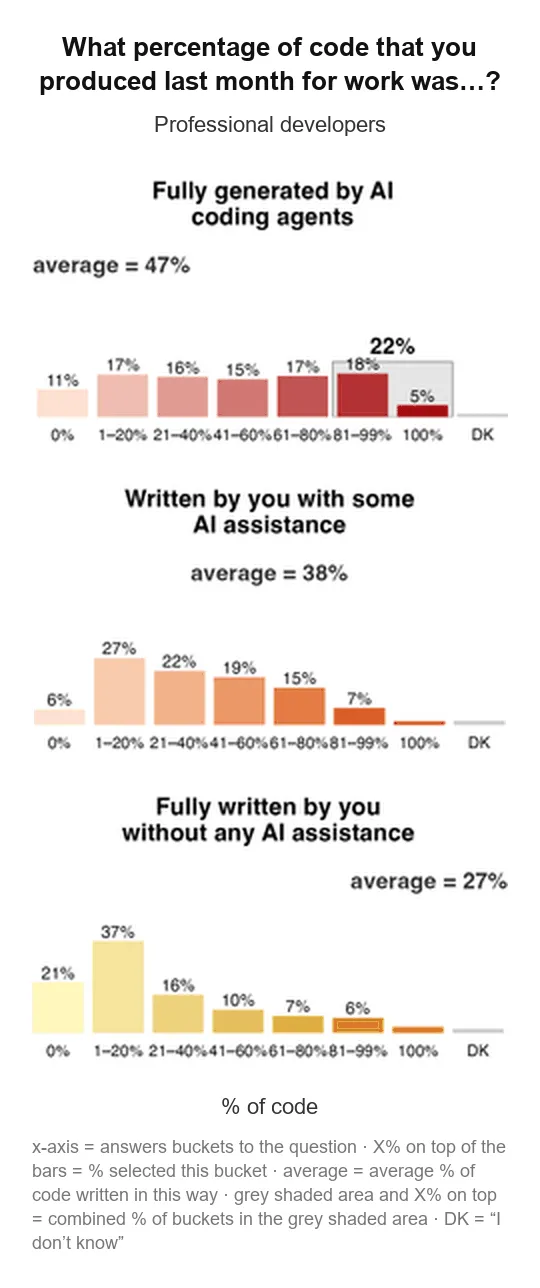
Source: JetBrains Research, 2026 Developer Ecosystem Survey (panels stacked for mobile)
That speeds up one part of the workflow. The rest is still ours. As owners of the problem, we still have to:
- Understand the problem
- Decide how it fits into the system
- Think about bottlenecks
When a bug reaches production, nobody asks which model wrote the code. The blame lands on whoever shipped it.
We’ve had tools that changed how we work before:
- Compilers
- IDEs
- NuGet
- Stack Overflow
AI is a bigger leap than any of them, but the rule hasn’t changed: the tool helps you produce the result, and you own the result.
You can’t judge what you don’t understand
If you haven’t watched DHH’s Rails World 2026 opening keynote, watch it. He said he wrote around 150,000 lines of code in August alone, five times his old yearly average of about 30,000.
Most of us aren’t at that volume yet, but we’re heading that way. Foundations used to help you write code. Now they help you judge the code AI writes for you.
AI may decide an array is a good fit for your order IDs and check them with Contains. With 50 IDs, you’d never notice a problem. But you know that Contains on an array scans every element, so as the data grows, every lookup gets slower. So you switch to a HashSet<T>, where each lookup takes constant time on average and duplicates are ruled out by design. A related question comes up in EF Core: how .Where(x => ids.Contains(x.Id)) behaves when the ID list gets large. See Where vs. WhereBulkContains.
// AI's version: every lookup scans the whole array
var processedIds = orders.Select(o => o.Id).ToArray();

// Your version: constant-time lookups
var processedIds = orders.Select(o => o.Id).ToHashSet();
You don’t need to know everything. But when AI hands you something you can’t explain, stop and ask yourself: How does this work? Why does it fit here? Under what conditions could it fail?
AI does what you say, not what you mean
AI won’t build you a modular monolith with every boundary in place (or a vertical slice structure that fits your team), or write queries that avoid every bottleneck, unless your specification spells out what you want.
When those details are missing, AI fills the gaps with assumptions.
A good spec includes:
- Context: the problem, existing workflows, and conventions.
- Constraints: module boundaries, allowed dependencies, and performance requirements.
- Edge cases: invalid inputs, repeated requests, and partial failures.
- What not to do: behavior to preserve and changes outside the scope.
- Acceptance criteria: observable results that define success.
For example:
Before: “Add order cancellation.”
After: “Add cancellation through the Orders module’s existing workflow. Only pending orders can be cancelled. Release reserved inventory, and ensure repeated requests don’t release it twice. Other modules must not update order status directly. Leave completed orders unchanged.”
Dave Plummer, who wrote the original Windows Task Manager, showed how much a written specification matters when he set out to vibe code a Task Manager that runs natively on Windows, macOS, and Linux. In his X post:
But you can’t just tell Claude, “Hey, write a task manager!” Well, you can, but it’ll be hot garbage.
So he put together a 107-page spec: “Everything you could ever want to know about a task manager, how it works, what it should do, and what it should look like.”
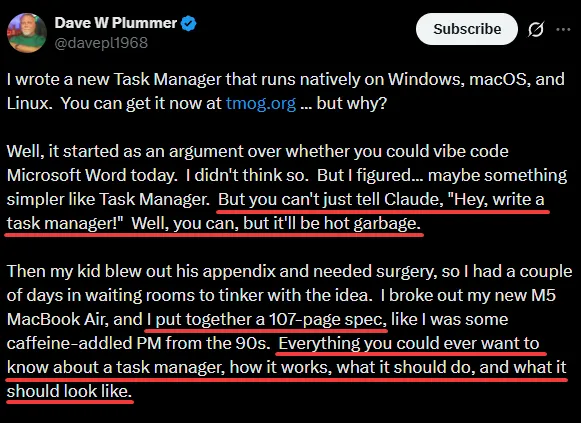
Source: Dave Plummer on X
The person who knows Task Manager better than anyone alive still started with a 107-page spec.
You still own the system’s design and the consequences of changing it. The specification helps AI work within those decisions.
Sharpen your debugging and verification skills
Start by reviewing the change against your requirements. Does it cover the expected behavior? What happens with invalid input, repeated requests, or an unavailable dependency? Retries against a non-idempotent operation are a classic gap.
Testing only the successful path won’t expose these problems. You need to check failure scenarios and how the implementation interacts with the rest of the system.
Debugging hasn’t changed. When something breaks, you still examine the logs, follow the execution path, and check your assumptions.
Before shipping, ask yourself: What evidence do I have that this behaves as required, including when something goes wrong?
Keep learning and understand your tools
To get the best out of AI, learn its strengths, limitations, and failure modes. Pay attention to what context it needs and where its suggestions fall short.
Use it to explain unfamiliar concepts, compare approaches, and challenge your reasoning. Then check what you’ve learned through documentation, experiments, and building things yourself.
Stay curious about the code you ship. Every decision you investigate and every failure you understand strengthens your judgment.
AI takes over more of the typing every month. You still own what ships, and learning is how you get better at owning it.